
Download NetCheck – Network Diagnostic Tool for Mac
Overview of NetCheck
NetCheck is a lightweight network‑diagnostic utility designed exclusively for macOS. First added to our catalog in 2007, the tool has helped over three hundred users identify and resolve connectivity issues before they impact end‑users. Although the software is offered as a trial version, its core capabilities are robust enough for small businesses, home offices, and even tech‑savvy individuals who need a quick, secure way to monitor network health.
The current release, version 1.6.1, was last updated on February 27 2007 and runs on Mac OS X as well as earlier Mac operating system releases. NetCheck’s small footprint means it occupies far less storage than many competing internet‑software utilities, making it an ideal addition to any Mac that values speed and efficiency. Because it focuses on proactive problem detection, NetCheck can save administrators valuable time and reduce downtime by surfacing hidden latency, DNS failures, packet loss, and other common network pitfalls before they become user‑visible incidents.
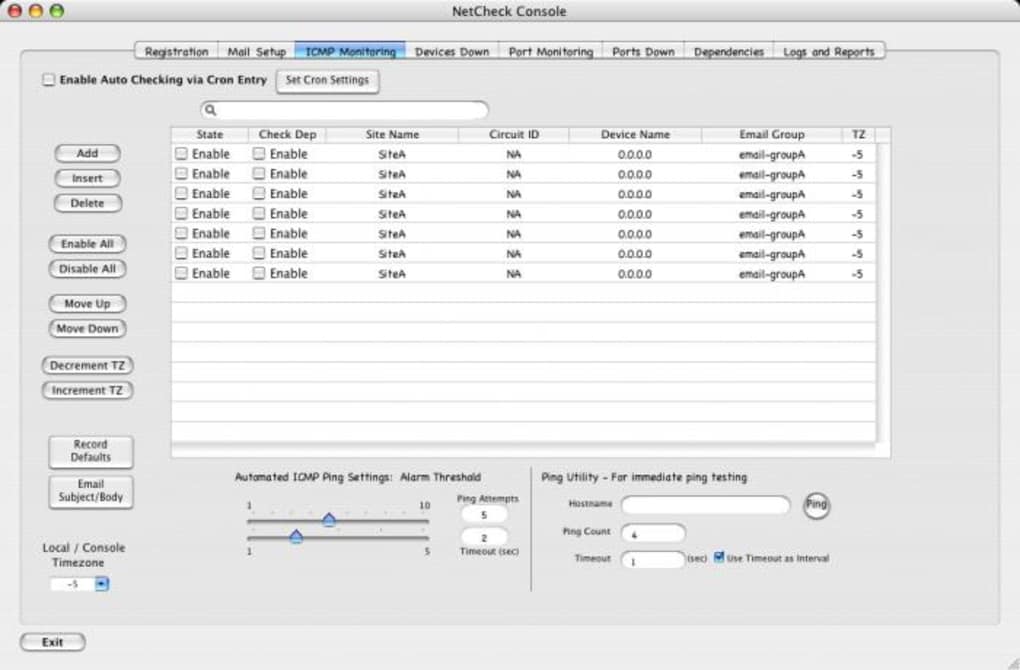
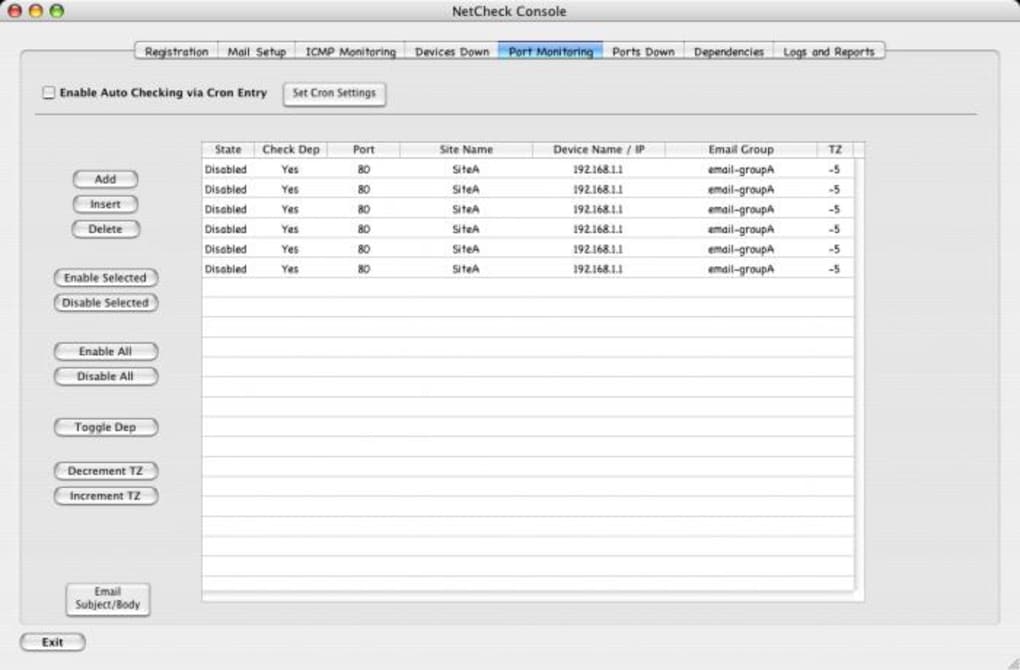
The application’s interface is intentionally simple: a clean dashboard displays real‑time statistics, while a series of diagnostic modules run in the background to continuously assess the health of your wired or wireless connections. Users can launch detailed reports, export logs for deeper analysis, and receive alerts when thresholds are breached. While NetCheck is currently available only in English, its visual cues and icons make it relatively easy to navigate for non‑technical users as well. The trial version provides a full‑featured experience for a limited period, after which users may consider purchasing the full license to unlock extended monitoring capabilities and priority support.
Key Features of NetCheck
- Real‑time latency monitoring – Measures round‑trip times to key servers and flags spikes instantly.
- Automatic DNS health checks – Verifies resolver availability and alerts on misconfigurations.
- Packet loss detection – Runs continuous ping sweeps to spot loss patterns across the network.
- Bandwidth usage overview – Provides a visual graph of inbound and outbound traffic.
- Customizable alert thresholds – Users can set specific limits for latency, loss, or bandwidth and receive desktop notifications.
- Exportable logs and reports – Generates PDF or CSV files for documentation or further analysis.
- Lightweight footprint – Consumes less than 15 MB of disk space and minimal CPU resources.
- Secure update mechanism – Downloads updates over HTTPS to ensure integrity.
Why These Features Matter
In a world where network reliability directly influences productivity, having a tool that watches the invisible layers of your connection is crucial. Real‑time latency monitoring lets you pinpoint slow‑responding hops before users notice sluggish applications. DNS health checks prevent the dreaded “website not found” errors that can frustrate customers and staff alike. Packet loss detection is especially valuable for VoIP or video‑conference environments where even a small percentage of lost packets can degrade call quality dramatically. By offering a visual bandwidth overview, NetCheck helps you identify bandwidth hogs early, allowing you to reallocate resources or upgrade plans proactively.
The customizable alerts mean you are never caught off guard; NetCheck can pop a gentle reminder on your desktop or send an email when a threshold is breached. Exportable logs are indispensable for compliance teams or IT auditors who need a historical record of network performance. Finally, the secure update mechanism ensures that each new feature or bug fix reaches your Mac without exposing you to tampering or malicious code—an essential consideration for any security‑conscious organization.
Installation and Usage Guide for NetCheck
Step‑by‑Step Installation
- Visit the official NetCheck download page and click the Download for Mac button.
- Once the
.dmgfile finishes downloading, double‑click it to mount the installer. - Drag the NetCheck icon into the Applications folder as instructed.
- Open the Applications folder and double‑click NetCheck to launch the program.
- If macOS displays a security warning, go to System Preferences → Security & Privacy → General and click Open Anyway.
- Accept the End‑User License Agreement (EULA) and allow the application the required network permissions.
- Choose the trial activation option; the software will automatically start monitoring your network.
First‑Run Configuration
Upon launching NetCheck for the first time, you’ll be greeted with a quick setup wizard. The wizard asks you to select the primary network interface (e.g., Wi‑Fi or Ethernet) and to specify the servers you want to ping for latency checks—common choices include Google DNS (8.8.8.8) or your corporate gateway. You can also enable the “Background Monitoring” toggle, which ensures the tool runs silently in the menu bar even after you close the main window.
After configuration, NetCheck populates the dashboard with live graphs and status icons. The left‑hand navigation panel lets you jump to specific modules: Latency, DNS, Packet Loss, and Bandwidth. Clicking any module expands a detailed view where you can adjust thresholds, start manual tests, or view historical data. To generate a report, select the Export button, choose your preferred format (PDF or CSV), and specify the time range you’d like to capture.
Tips for Efficient Use
- Schedule regular scans – Use the built‑in scheduler to run comprehensive diagnostics during off‑peak hours.
- Leverage custom alerts – Set lower latency thresholds for critical services such as database servers.
- Combine with other tools – Export logs and feed them into a centralized logging platform like Splunk for correlation.
- Keep the trial active – Remember that the trial expires after 30 days; purchase the full license to maintain uninterrupted monitoring.
Compatibility and System Requirements
NetCheck is built specifically for Apple’s desktop ecosystem. It supports macOS versions from 10.4 (Tiger) up through macOS 10.15 (Catalina). Because the software predates the Apple Silicon transition, it runs under Rosetta 2 on M1/M2 machines, delivering comparable performance to Intel‑based Macs. The program does not have Windows, Linux, Android, or iOS versions, making it a niche yet highly focused solution for Mac‑only environments.
Hardware Recommendations
While NetCheck’s minimal storage requirement (under 15 MB) means it can be installed on virtually any Mac, the following hardware specs are recommended for optimal performance:
- CPU: Intel Core i3 or Apple M1/M2 equivalent.
- RAM: 2 GB minimum; 4 GB+ recommended for simultaneous monitoring of multiple interfaces.
- Disk Space: 50 MB free to accommodate logs and export files.
- Network Interfaces: At least one Ethernet or Wi‑Fi adapter; additional adapters are supported.
Software Dependencies
NetCheck does not require additional runtimes or frameworks. It uses native macOS networking APIs and integrates with the Notification Center for alerts. The only external dependency is an active internet connection for initial activation and periodic update checks, which are performed over a secure HTTPS channel.
Future‑Proofing Considerations
As Apple continues to evolve macOS, users should keep an eye on future releases of NetCheck. The development team has indicated plans to add native Apple Silicon support and to introduce a full‑featured, paid version with extended reporting capabilities. For now, existing users can rely on Rosetta 2 for compatibility, but organizations that require long‑term stability should budget for a potential upgrade or migration path.
Pros, Cons, Frequently Asked Questions, and Final Verdict
Pros & Cons
- Pros
- Very low system footprint – runs smoothly on older Macs.
- Real‑time monitoring with customizable alerts.
- Exportable logs simplify reporting and compliance.
- Secure HTTPS update mechanism protects against tampering.
- Intuitive UI suitable for both technical and non‑technical users.
- Cons
- Only available for macOS; no cross‑platform support.
- Trial version limits some advanced reporting features.
- Last major update was in 2007, so UI feels dated.
- No built‑in remote management console.
Frequently Asked Questions (FAQ)
Is NetCheck free to use?
NetCheck offers a fully functional trial version that you can download and use for a limited period. After the trial expires, you need to purchase a license to continue using the full feature set.
Can NetCheck monitor multiple network interfaces simultaneously?
Yes. The application allows you to add and monitor several interfaces (Wi‑Fi, Ethernet, Thunderbolt) at once, each with its own set of thresholds and alerts.
Does NetCheck work on Apple Silicon Macs?
While NetCheck was originally built for Intel‑based Macs, it runs under Rosetta 2 on M1/M2 devices. Native Apple Silicon support is planned for a future release.
How does NetCheck handle privacy and data security?
All monitoring is performed locally on your machine. No diagnostic data is transmitted to external servers unless you explicitly export logs or enable the optional update check, which uses encrypted HTTPS connections.
Can I integrate NetCheck logs with third‑party monitoring platforms?
Yes. Exported CSV or JSON files can be imported into tools such as Splunk, ELK Stack, or custom dashboards for advanced correlation and alerting.
Conclusion – Should You Download NetCheck?
NetCheck fills a specific niche: a straightforward, low‑impact network diagnostics tool for macOS users who need immediate insight into latency, DNS health, and packet loss. Its trial version provides enough functionality for small teams or individual power users to evaluate its usefulness without upfront cost. While the interface shows its age and the lack of cross‑platform support may deter larger enterprises, the core capabilities remain valuable—especially in environments where network stability directly influences productivity.
If you run a Mac‑only office, a home studio, or simply want to keep tabs on your internet connection before users notice problems, NetCheck is a solid choice. Its minimal resource usage ensures it won’t bog down older hardware, and the ability to export detailed reports makes it easy to share findings with IT staff or service providers. For organizations that require multi‑platform monitoring or advanced remote management, you may need to complement NetCheck with additional solutions.
Ready to take control of your network health? USD 0.00 – Download NetCheck now and start diagnosing issues before they affect your users.







